
Check parts against the CAD model with CMMs, portable arms, and laser scanners in one interface. Run first-article and in-process inspection, then get a report without leaving the software.
- Autodesk Platinum Partner
- 30+ years in business
- US & CA support
Measure it once, trust the result.
PowerInspect compares physical parts against the 3D CAD model or 2D drawing, using whatever measurement hardware is already on your floor. Program offline, catch problems early, and document every result.
- Works with CMMs, portable arms, and laser scanners
- First-article and in-process inspection in one tool
- On-machine verification with spindle-mounted probes
- Reports generate automatically in PDF, Excel, or HTML
What you get with PowerInspect
Hardware independent
Connect CNC and manual CMMs, portable inspection arms, and non-contact laser or structured-light scanners through one interface instead of separate software per device.
On-machine verification
Measure parts with spindle-mounted probes while they're still loaded in the CNC machine, so you catch scrap or rework decisions before the part comes off the table.
Complex shape inspection
Apply best-fit strategies to freeform surfaces and complex geometry, then compare results directly against the CAD model or drawing tolerances.
Graphical programming
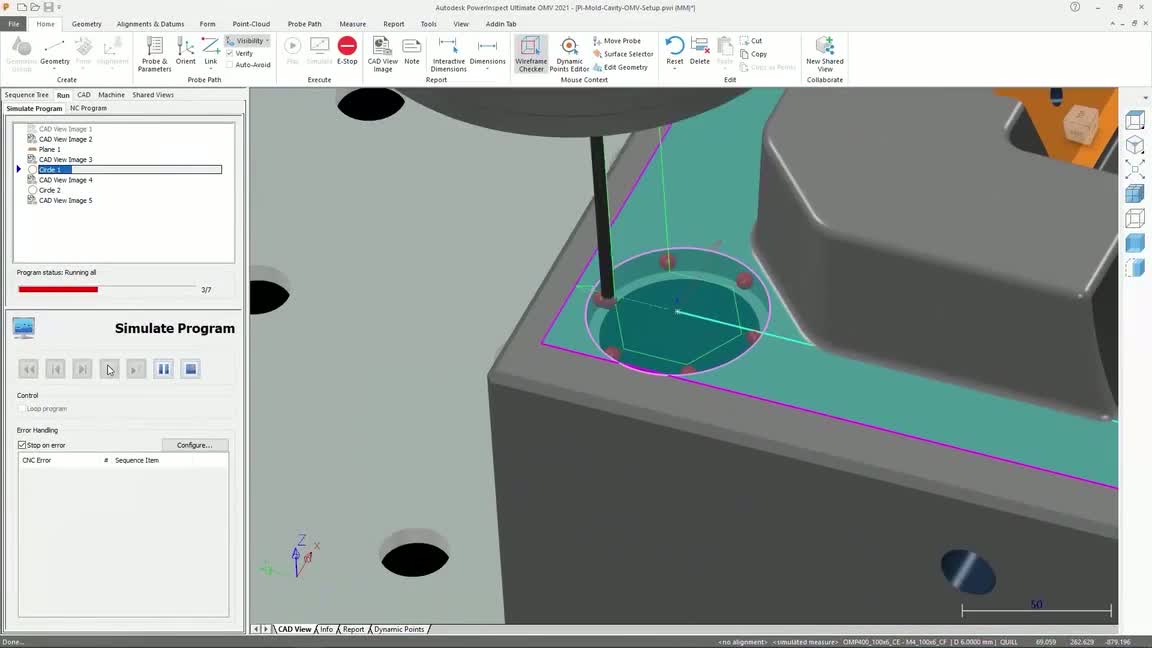
Build measurement sequences visually, with minimal part preparation, and simulate the full routine offline before it ever touches a real part.
Automatic collision checking
Simulate the inspection sequence in advance to catch probe and machine collisions before they happen, not after.
Reports without extra steps
Results compile automatically into PDF, Excel, or HTML reports, with deviation color maps and CAD view snapshots included.
Key capabilities
- One interface, every device: CNC and manual CMMs, portable arms, spindle-mounted probes, and laser scanners all run through the same PowerInspect interface, so switching hardware doesn't mean switching software.
- First-article and in-process: Validate a first article against the CAD model, then reuse the same inspection sequence for in-process checks during a production run.
- Minimize setup and downtime: Offline programming and collision simulation cut the time a part or machine spends waiting on inspection instead of running production.
- Built-in reporting: Every inspection compiles into a report with color-coded deviations, so out-of-tolerance features are flagged automatically, not found by scanning a spreadsheet.
Is PowerInspect right for your team?
| Best for | Comparing manufactured parts against CAD models with CMMs, portable arms, and scanners |
|---|---|
| Platforms | Windows desktop |
| Included | Manual and automated inspection, on-machine verification, offline programming, and automated reporting |
| File format | Reads major native and neutral CAD formats for comparison against measured data |
| Licensing | Annual or multi-year subscription, sold as Autodesk Fusion with PowerInspect |
| From DSI | Deployment help, certified training, and local technical support included |
A subscription is just the start
Buy PowerInspect through DSI, an Autodesk Platinum Partner. Get deployment help, certified training, and support from specialists who use the software every day.

Frequently asked questions
What is Autodesk PowerInspect used for?
PowerInspect compares manufactured parts against their CAD model or 2D drawing to check quality. It supports first-article inspection, in-process checks during a production run, and automated report generation.
What measurement hardware does PowerInspect support?
PowerInspect works with CNC and manual coordinate measuring machines, portable inspection arms, spindle-mounted probes in CNC machines, and non-contact devices like laser and structured-light scanners, all through one interface.
Is PowerInspect still sold as a standalone product?
Autodesk now delivers it as Fusion with PowerInspect, which includes Fusion, Fusion Team, and the Fusion Manufacturing Extension alongside the PowerInspect toolset. DSI can confirm which edition fits your inspection workflow.
Who uses PowerInspect?
Quality control engineers, inspectors, and manufacturing teams who need to verify parts against a CAD model, on the shop floor or on the machine, across aerospace, automotive, and general manufacturing.
Can PowerInspect measure parts without removing them from the machine?
Yes. On-machine verification uses spindle-mounted probes to measure parts while they're still loaded in the CNC machine, so you can make a scrap or rework call before moving the part to a separate CMM.
Get in touch with our team today!
Talk to a DSI specialist about PowerInspect licensing, bundles, and training built around how your team works.